Family Chore Chart Template for Multiple Kids
Splitting chores between two, three, or four kids is hard to eyeball. One child ends up with all the dishes while another skates by, and nobody can quite tell until someone complains. This family chore chart template is built for exactly that: add every kid, give each one a color, and assign chores across the whole household on a single weekly grid.
The workload view helps you see it. As you assign tasks, it adds up the editable points on each child's chores, so if one kid is carrying more you can spot it and shift a chore before the week starts. The points are a rough estimate you set — not an objective measure of time or effort — so change them when your family sees a chore differently. Set an age for each child and the library floats age-appropriate suggestions to the top. Everything runs in your browser, free, with no account.
Open the free Chore Chart Builder
How to balance chores across several kids
- Add each child and give them a distinct color. Names are all that's required, and the colors carry through the grid, the workload view, and the printed chart so everyone can spot their own tasks at a glance.
- Enter each kid's age (optional). The chore library reorders to float age-appropriate picks to the top, flagged as suggestions, so a 5-year-old sees tidy-toys near the top and a teen sees taking out the trash — without anything being locked away.
- Pick chores from the library or add your own, then assign them to kids on the weekly grid. A single chore can go to one child on Mondays and a sibling on Thursdays, so recurring jobs rotate instead of always landing on the same kid.
- Watch the workload view as you go. It adds up the editable points on each child's chores, so if one total runs long you can move a task or a day. The points are a starting estimate — change them when your family sees a chore differently.
- Turn on points if you want a tally (optional). Points give older kids a visible target and make trade-offs concrete when the family is deciding who does what.
- Print or save as PDF. Choose one shared family chart or a separate page per child, then post it on the fridge. There's no watermark, paywall, or sign-up.
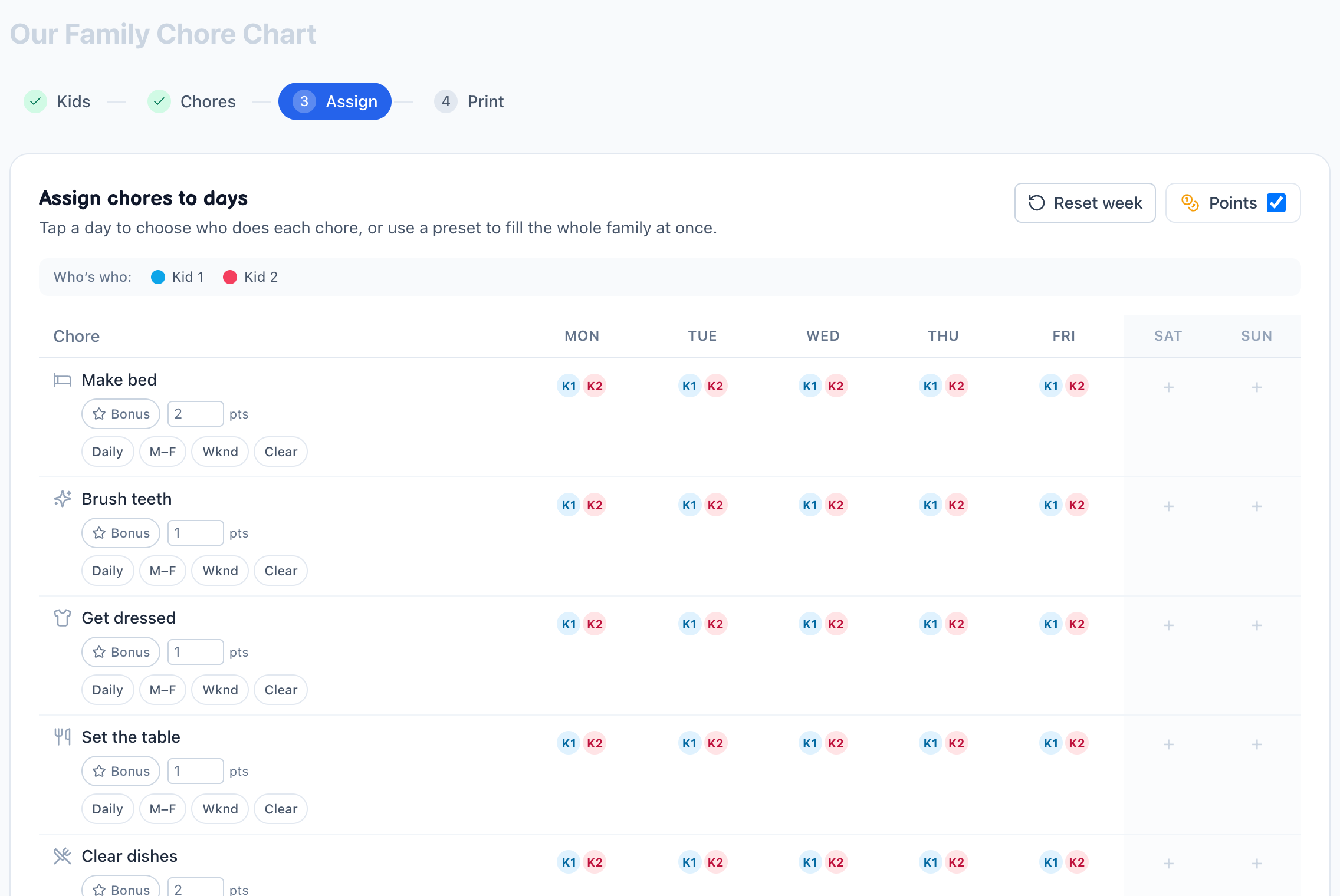
A worked example
This is a hypothetical product demonstration — it shows how the tool adds up the points you set, not a recommended schedule or a real family.
Two children and six chores, assigned Monday to Friday. With the default point values below, each child ends up with 30 chore assignments and 45 points for the week.
| Chore | Points |
|---|---|
| Make bed | 2 |
| Brush teeth | 1 |
| Get dressed | 1 |
| Set the table | 1 |
| Clear dishes | 2 |
| Feed pet | 2 |
| One weekday total | 9 |
Change one input — reassign a chore, edit a point value, or drop weekend tasks — and the totals change with it. That makes the chart a planning conversation, not a verdict.
Frequently asked questions
- How many kids can I put on one chart?
- As many as your family needs. Add a card for each child, and the weekly grid and workload view expand to include everyone. Each kid gets a distinct color so the shared chart stays easy to read, even with four or five children on it.
- How does the workload view decide what's balanced?
- It adds the point value for each assigned chore and shows the totals side by side. The values are editable workload estimates you control — not an objective measure of fairness, time, ability, or effort. Adjust them whenever your family's experience differs from the starting values.
- Can I give my younger and older kids different chores?
- Yes. Set each child's age and the library reorders to surface age-appropriate chores near the top, flagged as suggestions. Nothing is hidden or blocked, so you can still assign any chore to any child. The labels are starting points to help you browse, not rules — you decide what fits and whether supervision is needed.
- Can each child have their own chart instead of one shared grid?
- When you print, you choose between a single family chart with every kid side by side, or a separate page per child. The per-child layout is handy when kids are in different rooms or you want each one to track only their own tasks. Both come from the same assignments, so they always stay in sync.
- Do I need an account to save a chart for multiple kids?
- No account, and nothing to install. Your chart, including every kid, color, and assignment, is saved in your browser automatically and is ready the next time you visit on the same device. When you want a copy, just print it or save it as a PDF.